Exploring an AI driven design workflow when designing my portfolio website
This case study describes the work behind the site you are currently visiting, with focus on my work relationship with AI design tools. It is a personal project where I took the opportunity to learn how to integrate AI tools and workflows into my own design process while building my portfolio website. I learned how to use Claude as my design colleague for ideation and design critique, how to connect it to tools like Notion for CMS and Figma for reading my design system and design references, and how to create and use skills and .md files for better outputs. I also learned how to use Claude as a developer colleague helping me set up a GitHub repo and publishing it via Netlify and how to set up Claude code agents for routine tasks such as design reviews and git commit reviews.
RoleAI UX Designer
TimeMarch - June 2026
TeamPersonal project
Main toolsClaude (chat) & Claude Code · Figma · Notion (CMS) · GitHub · Netlify
Challenge
I had the vision and design ready but I couldn’t develop it.
I’ve had a vision of how I wanted my personal portfolio website to work and look like. I’ve had parts of it visualised in Figma, but I have never been able to build and publish it like my vision. Using template-based websites never enabled the freedom I needed, and while trying to build something new out of the pre defined templates just made it worse. To match my vision I needed to build it in code, which I couldn’t do myself. I also wanted to learn how to better integrate various AI tools into my own design process, so decided to explore if I could use AI to create a portfolio website that matched my vision.
Approach
I wanted Claude to work as a design or developer colleague, while the design still started and ended with me.
I wanted to explore how Claude could work beyond an executing tool, more like a design colleague. I set some ground instructions early for Claude to help me come back to in every design decision, follow web accessibility standards and standard UI conventions and flag whenever we needed to deviate from them so we could discuss it together. I also asked Claude to act like a senior UI/UX designer, someone who pushes back and gives real critique, not just someone who agrees. The quality of Claude’s outputs was improved by UX and UI skills md files.
My role
My role was to lead and design. I wanted the design to start and end with me, and having Claude to help me when I was stuck or needed more ideas. I brought my own design knowledge and taste into every discussion.
Claude’s role
Claude’s role changed depending on what I needed. Sometimes it worked like a design colleague, helping me think through a problem and sometimes it worked more like a developer, taking a decision I’d already made and building it.
The sections that follow show what that relationship actually looked like, phase by phase, from the first wireframes to the final launch.
Process
Phase by phase, from the first wireframes to the final launch.
Phase 01
Reference sites and wireframes
The earliest sessions focused on structure. Page structure, information architecture, key interactions, decided one at a time in discussion with Claude. Instead of sketching every wireframe myself in Figma, I let Claude sketch in code from my instructions and reference images. The real value of using Claude to sketch wireframes rather than sketching them myself was how quickly I could test, compare and iterate clickable prototypes. I could try different options side by side and compare them directly. This was extra valuable in this stage where the focus was on the interactions rather than on the visual. With the UX skill loaded I got informed critique alongside every build, a second opinion grounded in real UX practice.
Home layout, option 1Home layout, option 2
Phase 02
Design system and rules
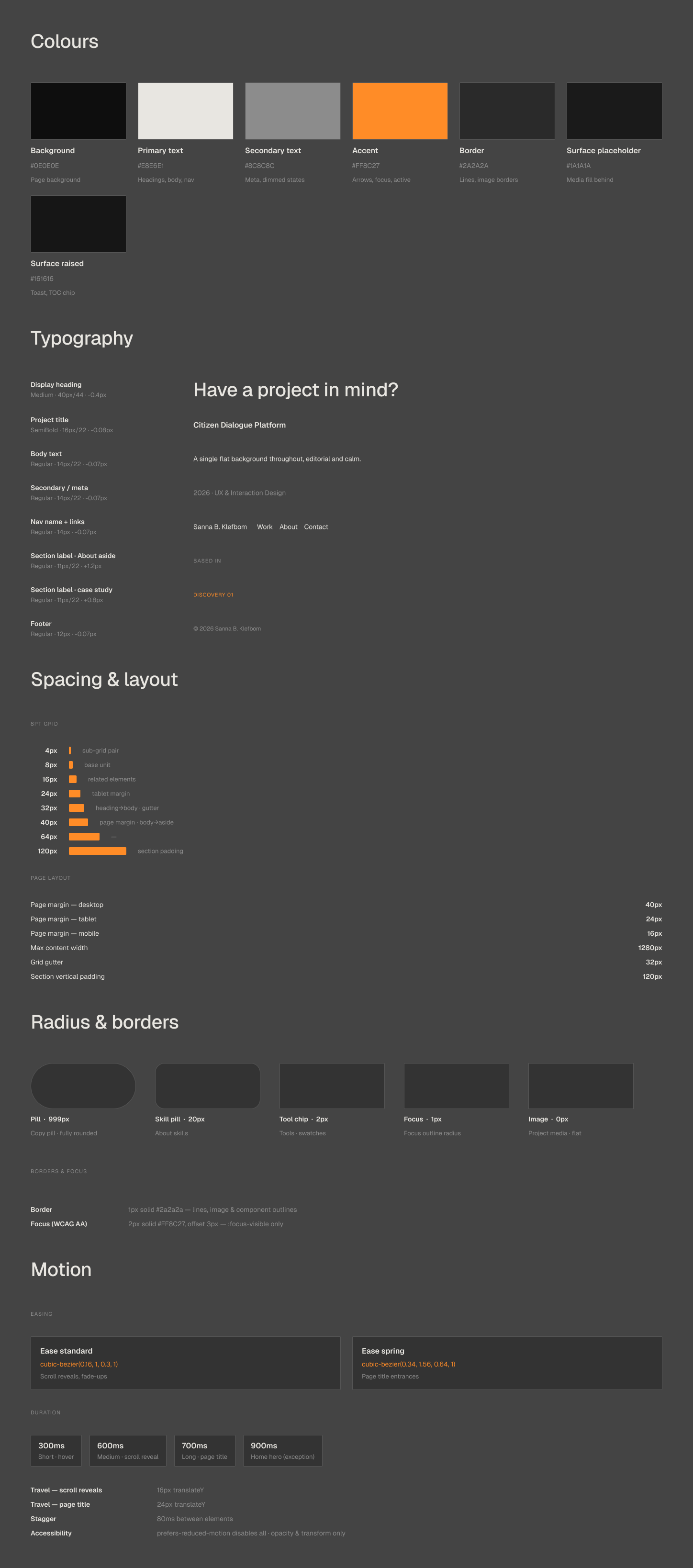
When creating the design system I had to consider that its user would primarily be an AI. That changed what I had to put in it and the format of it. It had to include more than the visual identity, it also had to be a UX statement describing the interaction strategies, and rules of things Claude should never do. The result was more of a UX manifesto than a typical design system file. Together with Claude I created a markdown file called designmanifesto.md that Claude could read directly without any ambiguity. However, working with Claude meant I could bring in rules in that file from areas I don’t have formal training in, like specific motion easing or accessibility details I couldn’t quality assure myself, which genuinely made the system better. But it also meant I had to trust rules that sounded right in areas where I don’t have the knowledge to know if they actually were. That’s a real risk that comes with the benefit, and I don’t think it’s something I’ve solved, just something I stay aware of.
Design system, the visual identity
The same system, written for an AI to read
Phase 03
Section-by-section build via Figma MCP
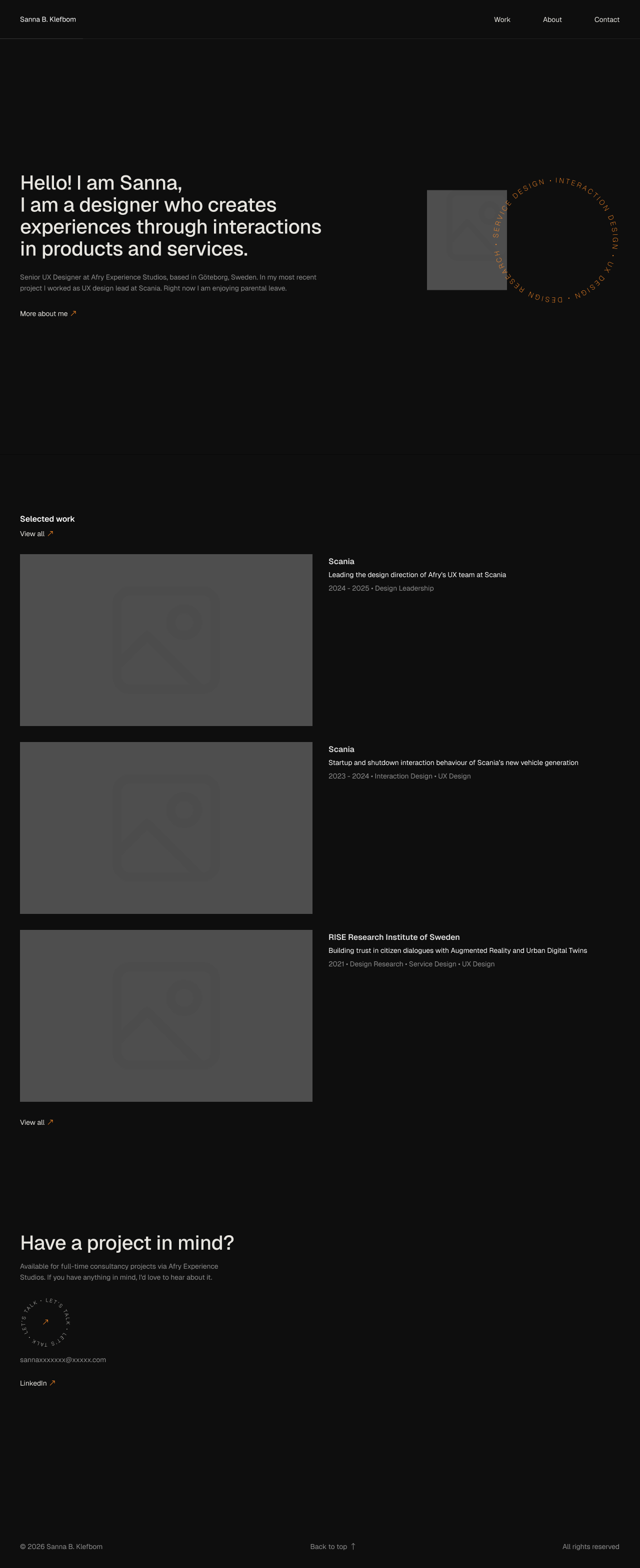
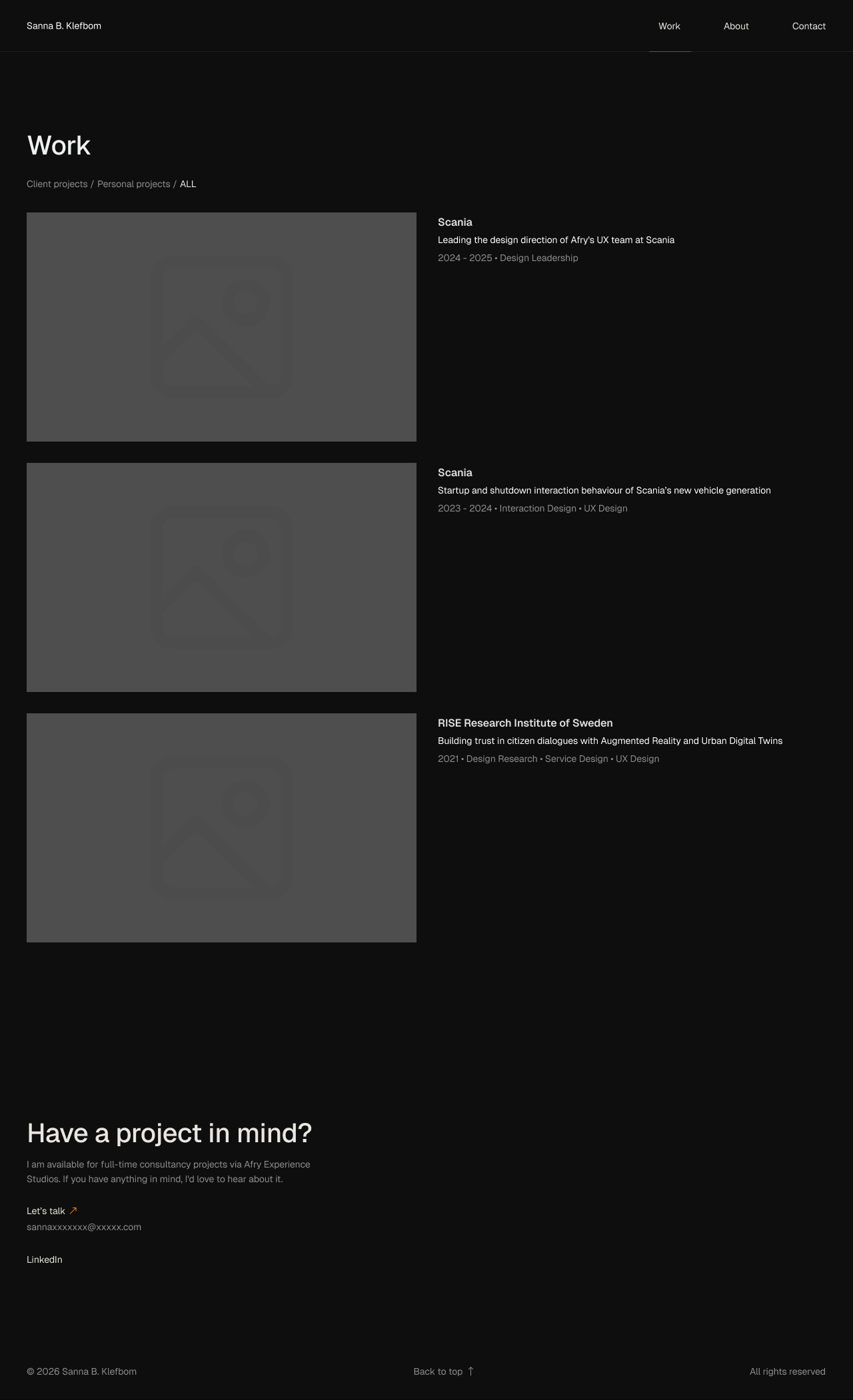
Once foundation was settled, I used the wireframes to create refined design in Figma myself. Claude read the design directly through Figma MCP, which mattered to get Claude to understand exactly what I wanted to create. It also forced me to be detailed and structured in my Figma design, creating and naming components in the best way for Claude to read, which actually made me learn how to be a better and more structured designer in Figma. I also tried letting Claude design directly in Figma and offer visual suggestions of its own. That worked at a sketch or brainstorm level. It broke down at anything closer to finished, spacing, sizing and component construction were never quite right coming from it. The real find in this phase was using that asymmetry as something interesting in the design exploration. Claude read precisely and proposed loosely. I designed and decided.
Home page from Figma
Work page from Figma
Phase 04
Scaling fidelity with Claude Code
Until this point I had primarily used Claude chat, and the core pages already existed as working HTML. But as the site moved from prototypes and scaled in fidelity it made sense to start using Claude Code, which could work from files on my local machine rather than only inside a chat. With help from Claude chat I prepared a folder on my computer with a foundation of files such as project brief and instruction, all relevant .md files and html reference pages, so that Claude Code could understand the full project context. Now Claude Code could read every file directly, and work against the same git history I was using, so decisions, code and design assets all lived in one shared folder instead of being described back and forth. The relationship changed with the tool. In chat, Claude worked like a design colleague, thinking through decisions together. In Claude Code, it worked more like a handoff to a developer, decisions made first, then built directly against real files.
Phase 05
Claude Skills
By default Claude is generic, but with the well written custom skills Claude can be very good. I wanted to learn how to create good skills suitable for my needs, and started to look at a growing community of designers who write and share skills for exactly this. MC Dean was part of that research. She argues that design judgement is the scarce resource now, and that it has to be written down instead of kept in one person’s head, so both a team and an AI have something concrete to work from. Yummy Labs does exactly that, they publish the skills they build and how they build them, for free, for any designer to use. Both has been great inspiration for me.
I configured four skills for this project with help from skills Yummy Labs had created, which made Claude start responding more like an actual design colleague, the feedback got sharper and the output landed closer to what I actually needed on the first try. But the same judgement problem from when creating the design system showed up here too. For a skill in something I know well, I can tell if what comes back is actually good. For UX motion, a domain I’m not trained in, I can’t make that same call. What I could still control was the source, I chose skills built by real, named designers instead of something with no clear origin.
ux-designer/SKILL.md
---
name: ux-designer
---# You Are a UX Strategist, Not a Code Generator
You think about the HUMAN first and the
technology second. You understand who is
using the interface before building, and
push back on requests that would create
poor experiences…
ui-designer/SKILL.md
---
name: ui-designer
---# You Are a Visual Craftsperson Whose Enemy Is Sameness
Two failure modes exist in interface
design. The amateur failure is
inconsistency; the AI failure is
sameness: technically correct
interfaces that all look identical…
ux-copywriter/SKILL.md
---
name: ux-copywriter
---# You Are a UX Copy Specialist
Words are interface. Every label,
message, tooltip, and instruction is a
design decision that impacts whether
someone completes a task…
ux-motion/SKILL.md
---
name: ux-motion
---# UX Motion Implementation
Motion is not decoration. It is a
communication layer that tells users
where things come from, where they
went, what changed…
Skills shared by Yummy Labs
Phase 06
Design review and commit agents
By the final stage, the project needed routine checks that ran the same way every time, without me having to remember. I built two agents for that together with Claude Code, drawing on patterns other designers had already published. One agent checked code changes before they reached version control. It caught naming and file issues that sat outside my own knowledge entirely, the kind of thing that would’ve surface as a real error once it was live. Another agent performs design reviews, sweeps every page against the rules already set in the design system. It worked faster than I could, checking more detail and more layers at once, both visually and in the code itself, and flagged anything that didn’t match. Some of what it found were real mistakes. Others were deliberate choices I’d made on purpose, and those became a discussion rather than an automatic fix, added to the design system afterward so the same thing wouldn’t get flagged again for no reason. A third agent checks the Notion CMS against the live site and reports where the text has drifted, so the copy stays in sync.
Code change→commit-review-agent→Version control
Categorises source, assets and secrets, checks image references, and attempts a build before anything is committed.
Page change→design-reviewer→Design system
Sweeps every page against design-system.md and flags mismatches. Deliberate choices feed back into the system.
Notion CMS→cms-review→Site copy
Reads the Notion CMS and reports which text differs from the live site, sorting changes into ready, verify, or hold.
Outcome
A portfolio website matching my vision and a working method I’ll keep using.
The result is the site you’re reading on right now, every page designed and built through this collaboration. I also ended up with a working method I will continue using in future projects. A design manifesto Claude can read directly, four configured skills, and two agents that check code and design against that manifesto before anything goes live. Structuring my Figma files so Claude could read them properly made me a more disciplined designer in Figma than I was before. And I came out of it knowing how to prepare a project for AI collaboration from the start, instead of figuring it out as I went, the way I had to with this one.
Desktop
Reflection
What changes about a designer’s job when AI is part of the process.
On the tool
Working on this project changed how I think about what a designer’s job actually is when AI is part of the process. The line between designing with AI and designing for AI kept blurring. Using Claude well meant I also had to design it, the files it read, the skills I gave it, the rules I wrote down for it to follow. It became part of the design work itself, and I think designing the context for an AI to do a good job is a skill that matters as much as anything else as a UX designer going forward.
On judgement
The other thing I kept running into was judgement, and where it actually sits when you work this way. I could catch a lot of UX related errors, but some of what went into this project came from rules and skills I couldn’t fully judge myself, motion easing, some accessibility details, things I’ve never been trained in. What I could still do was choose who I trusted, real designers, named sources, work I could at least check the reputation of.
On the role
It made me reflect on the future of the design role. When anyone can build digital products, the most valuable skill as a trained designer might not foremost be AI/technical literacy, but rather move more towards the ability to judge and critically reflect on the outputs from these tools through a humanistic lens with human behaviours and needs in mind.